Showing posts with label Fun. Show all posts

Wednesday, 18 May 2016

What Can I Learn/Know in 10 minutes That Will Be Useful For The Rest of My Life?

Ever wondering what you can do meaningfully when you have only 10 minutes of free time? Yes, you will be amazed when you realize you can actually learn/know things by using 10 minutes of your free time and it will be useful for the rest of your life!


  1. A good joke
    Sometimes when you talk to a new friend or in a group, it is normal to have an awkward moment to happen. A good joke will be just in time to break the silent moment.

  2. Setting hair 
    Sometimes you just don't have time to make up yourself. Research shows that a make up of yourself can in fact build your confidence. Hence, why not use the 10 minutes you have to search online to learn the way to set your hair fast and nice.

  3. A magic show
    This is similar to learning a good joke but learning a magic and show to your friends can leave a great impression your friends on you. After all, magic show is more on visual and will be more persuasive.

  4. Wrapping present
    This is a soft skills that might be your less priority but once you master it, you can impress your friends easily. And yes, this skill is going to accompany with you for life just as you know how to ride a bicycle even you don't practice nowadays.

  5. Speed cleaning
    Look at the youtube and you can easily learn how to do speed cleaning in your room. I am sure you want your room to be clean and neat all the time, don't you?

  6. Photo skills
    This might need a few accumulation of your 10 minutes. You can learn online how to take a nicer photos to get more likes when you post your photos on Instagram. Learn one skill or two for each of your 10 minutes and apply it.
Obviously, 10 minutes seem little for you but if you utilize it properly by doing something meaningful as above, it actually brings you a positive outcomes without any doubts. Let's start thinking and planning what you can do so that when you are free for 10 minutes, you know what can be done/improved. Cheers.

Monday, 4 April 2016

Whatsapp Features You Didn't Know - Part II

If you have missed the first part of the Whatsapp features, click Whatsapp Features You Didn't Know - Part I.

Whatsapp Features You Didn't Know

  1. Kind reminder
    You might have experienced the times where you have seen the messages then forgetting to reply them? Yes, we understand sometimes replying to that messages are just not the top priority during that time. To avoid this to happen again or miscommunication, Whatsapp has a feature where you can mark the chat with blue dot for you to attend to it later. Just swipe that chat to the right and the option to Mark as unread will be shown up. Simply tap on it and the blue dot will appear to be there to remind you to read that and reply later.


  2. Customise your notification
    Again, we know you have quite a few group chats but some of the group chats might be just annoying and you really do not wish to receive the notification or vibration from that particular group chat especially when you are having meeting or work in the office. What you can do here is to tap on the group chat, then on the name of the chat, click the Custom Notifications. From there you can choose from a variety of sound alerts for both calling and texting purposes. And this is also the place where you can even put no sound for your notifications. Just simple and cool.

    [Tip 1]: This applies to both individual and group chats as well. Some people may utilise this function in another way. For instance, if you wish to put certain chats, say your best friends and family, as your top priority in replying the messages, you can simply customise the notification with an unique sound alerts for these particular chats so that you get to identify them and reply them the soonest possible.


  3. Prevent others to read your messages
    This is another trick considerably useful for those who do not wish to have the messages being read by others. All you need to do is to go to Settings, then Notifications, and disable Show Preview. From now onwards, your notification will just reveal the sender's name but without any contents.


  4. More time for yourself to reply messages
    Sometimes we might need to take a little more time to formulate our response rather than just replying the sender right after reading the messages. We also do not wish to have the sender realized we actually looked over the messages again and again. However, the double blue ticks has taken our privacy and privilege away by letting the sender knows we have read but pending to reply. To prevent this to happen, you can go to Settings, then Account, and then Privacy to have this changed. Switch off the Read Receipts. With this function, your "last seen" will not be seen by others anymore neither the blue ticks.

    [Tip 2]: Note that when you switch off the Read Receipts, you won't be able to see if people have read your messages either. However, read receipts will always be sent for group chats.


  5. Locate Group Chat
    Pretty sure most of you did not know that you can find old group chats by checking with individuals. This is useful when you wish to revisit old group chat but you can't remember where to find them. Chances are you will remember who was in the chat rather than what the chat name was. All you need to do is to tap on any individual chats, and tap their name for more information. From there you can see the groups you both have in common, which then makes it easier for you to find the group chat that you have been looking for.


With these 10 hidden features in Whatsapp being introduced, we hope you can now use Whatsapp more effectively and convenient. Enjoy!


Whatsapp Features You Didn't Know - Part I

Whatsapp has been famous for secretly coming out with new hidden useful features whenever they have an update. Have a look at the features below, to which we believe you learn some new features from us about Whatsapp. Stay with us now.

Whatsapp Features that You Didn't Know

  1. Bold,Italics and understrike  your message
    Whatsapp is making your communication in a better way to the recipients. Instead of being rude like last time where you can only do like DO YOU UNDERSTAND! to emphasize your points, you can now bold, understrike or make your words in italics form. And guess what, it will not use up much time for doing that.


    [Tip 1]: To make your message bold, simply add *before and after the text. For instance, typing *how are you doing?* will give you how are you doing?

    [Tip 2]: To make your message in italics, simply a _before and after the text. For instance, typing _how are you doing?_ will give you how are you doing?

    [Tip 3]: To understrike your message, simply add ~before and after the text. For instance, typing ~how are you doing?~ will give you how are you doing?

    [Tip 4]: To make it even astonishing, this formatting is not necessary to be used independently. In other words, they can be used together. You can do a few combination by putting those symbols before and after the text to have a few formatting at one time. For instance, typing ~*_how are you doing?~*_ will give you how are you doing? How cool right?

    Watch the video below if you just feel lazy to read.


  2. Send PDF document through Whatsapp
    One of the big updates about Whatsapp is that now it allows users to send PDF documents to recipients using Whatsapp rather than just photos/videos previously. For Android users, tap on the attachment icon on the top right corner of the interface. For iOS users, click the arrow up icon on the bottom left where you should see a new "Share Document" option.

    [Tip 4]: So far it only allows the document to be in PDF format. Besides, the recipients must also have updated his/her Whatsapp to the latest version in order for you to send the document over.


  3. Care about your internet data
    As we all know, Whatsapp call has been introduced for some times. Some of us might be wondering if this will consume lots of internet data, and thus trying not to Whatsapp call for long time. Now, you can go to Recents, tap on "i" next to any name to bring up the related information on that caller including how long you called with the person as well as the amount of data it used up exactly. Yes, try it now and you will be amazed. But if you are using Wifi, then you can just call hours without any concern.

  4. Star your message as favourite
    We bet you have so many individual and group chats in your Whatsapp record. Occasionally, we need to find back the record for a certain important numbers, notes or link but it just takes up so much time to do that. Worries not, now if you think that a certain message is important to you, all you need to do is to long hold the message so that a star sign will pop out. Tap the star and it will automatically save that important message as favourite. Imagine how easy your life will be with this starred messages can be reached so easily for your future reference.

    [Tip 5]: To view your starred messages, click the Setting at your bottom right and you should see the Starred Messages at the top row.


  5. Use Whatsapp on laptop
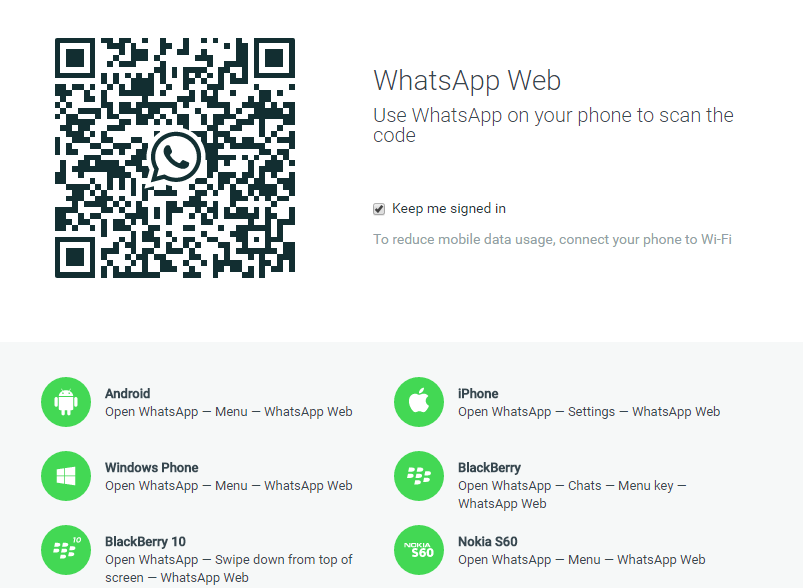
    Just like the Line app, finally Whatsapp comes out with the feature where you can also use Whatsapp on your laptop or other devices rather than just over the phones. All you need to do is go to Settings where you can see WhatsApp Web. Subsequently, go here on your computer and scan the QR code that appears in your phone. Yes, you can now start chatting with anyone without even the need to download the whatsapp software or anything on your computer in advance. How convenient is this!

And...hold on, we are not done yet. There are still many new features on Whatsapp that we can't wait to share with you. Click our next post:  Whatsapp Features You Didn't Know - Part II to explore even further.

Thursday, 24 March 2016

The Great Features You Can Get From iOS 9.3

Your phone might have popped out a notification to remind you to update your iPhone to the latest operating system, i.e. iOS 9.3. As usual, this is a free update and it brings quite a few new features that can be used for iPhone users. Let's look at the best features that iOS 9.3 has that we believe you would like it and wouldn't want to miss it.

Best Features You Can Get From iOS 9.3

  1. Night Shift available on screen to make easier on your eyes
    Night Shift is now available on iPhone with iOS 9.3 which basically allows you to change colour from bright white and blue to warmer colour on the screen at night. With this feature, iPhone will automatically detect your night time based on your time on phone and then change your screen colour to warmer colour. You can adjust the level of colour of your screen in the setting.

    [Tip 1]: You might wonder why Apple comes out with this feature. Research found that blue light emitted by LED screen will reduce the production of melatonin, i.e. the hormone that messages our brain to sleep. Switching from bright colour to warmer colour is said to make your eyes more comfortable and allow your body to fall asleep more naturally.


  2. Write your Notes with passcode now
    iPhone users used to complain about the Notes app in iPhone where it is less flexible to be used. Good news here, iOS 9.3 now allows users to be able to lock up their notes in Notes app with a passcode to be keyed in. Notes written in the app can also now be sorted by dates and title. Hence, this new features has made our life easier without any doubt.


  3. Better News app that is tailored made for you
    Apparently, the News app is also being updated so that the news or articles you read will now be popped out according to your interest. The app also got performance updates, which loads faster and you can watch the videos from the feed. 

  4. Smart tools for teachers
    The classroom app helps teachers deliver the lesson plans and track their students' progress. Besides, students can now share the same iPads among a few classmates by logging in with a different account to personalise what they see.

  5. Others and Miscellaneous 
    [Tip 2]: There are new 3D Touch Shortcuts for the Weather, Settings, Health, App Store, iTunes Store and Compass apps. 

    [Tip 3]: You can now duplicate photos in your Photo app. 

    [Tip 4]: Siri now supports Hebrew, Finish and Malay languages. 

What are you waiting for? Let's go to the setting and start updating your phone to enjoy the new features of your iPhone. Enjoy!

Friday, 18 March 2016

The Incorrect Ways to Have Your Phones Charged

Owning a smart phone is good but sometimes it is really irritating where it needs to be charged at least once or twice per day. Before blaming the imperfectness of the phone, we should be aware of that could be caused by the ways we charge our phones. You might have charged your phone incorrectly that brings your phone to have a relatively shorter life span. Let's look at what should be done when doing the phone charging.


  1. Use the correct phone charger provided
    As you might know, in order to have your phone to be fully charged in a shorter period, you can use iPad charger which provides higher power. However, this is not recommended as it may harm your phone in the long run. The best way to do would be to always use the original phone charger to charge your phone.

    [Tip 1]: Same concepts applies to the charging cable where it is recommended not to use the cables bought from unknown brand as it can harm your phone and for safety purpose too.

  2. Do not use phone when charging phone
    Many people like to use the phone to continue texting, playing games or scrolling facebook when the phone is charging. Phone should not be used to ensure the phone is charging under optimum condition. Having the screen on when charging phone is harming your battery as well as affecting your body health in long run.

  3. First time charging for 8 hours is not necessary
    Many phone users are always told to have their phone charged for approximately 8 hours first right after they purchase the phone to activate the phone. This might not be necessary now. This is because most of the smart phones are using lithium battery which can have the phone functions without the need to charge it to full for its very first time. It is recommended to just charge for normal time even it is first time charging the new phone.
  4. Room temperature when charging phone
    It is recommended to have your phone charged at the normal room temperature, not too high or too low. Having your phone charged at lower temperature deters the chemical reaction to be taken place in the battery and thus lengthen the time needed to charge the phone fully, Likewise, charging your phone at high temperature might cause the lithium battery to be unstable and therefore explosion is possible to happen!

    [Tip 2]: You should also power off your phone once a while regularly to restart the phone. It is to avoid your phone being lagging when using and to lengthen the life span of phone.

Besides fixing the way you charge your phone, you should also take care of your phone properly, eg. have a phone cover and avoid dropping your phone frequently so that you can your phone for at least a few years for sure. Why not start practicing the right habits in charging from today? Cheers.

Tuesday, 8 March 2016

Keyboard Shortcuts for Word Document

Similar to Microsoft Excel, Word Document also has its own unique keyboard shortcuts that you can certainly use to simplify your life. No more wasting time in typing and formatting in word documents as long as you follow the 6 key shortcuts we introduced to you below. These keyboard shortcuts apply to any version of your Word Document, how nice right?


  1. CTRL+ENTER: A faster way to do "Page Break"
    When doing formatting, we tend to use Insert >> Page Break so that the rest of the paragraphs will go to the next new page. Now, you can simply use CTRL + ENTER keys to bring you to next new page, which saves you just a significant few seconds in clicking the mouse to do that.


  2. CTRL + +: Subscript
    CTRL + SHIFT + +: Superscript
    For instance, when you are typing a2 where you would like to make the "2" to be superscript, you can first highlight the "2" and then use the shortcut keys to make the "2" a superscript. Same thing applies to using subscript shortcut as well.


  3. Double Click Format Painter : Unlimited Use of the desired formatting
    Instead of repeating the step of clicking "Format Painter" each time when you want to format, now you can try this shortcuts by double clicking the Format Painter button so that it will repeat the same formatting until you click it once again to complete the formatting.

  4. ALT + SHIFT + D : Date Now
    ALT + SHIFT + T: Time Now
    Simple here, just do the shortcut to have your date or current time on the word. If you would like to update it later, just right click and click "Update field".

  5. A quicker way to clear off all your formatting
    In the case where you have a document from some other sources where you would like to maintain those writing but NOT the formatting, we have a quicker way for you to do that. Simply copy down all your wording to Notepad to which it will make all your wordings to the most original format (i.e. no format). Then, you can copy them again from Notepad back to the word document.

  6. SHIFT + 5: Go to the place where your cursor is 
    Sometimes when you have so many wordings in the word document and you have just missed the track of where your cursor is. Worry not, we have a shortcut key for you to go back to where your cursor is, i.e. SHIFT + 5. Yes, as simple as that.

Now it's your time. Open up word document and have fun trying them! Learn it to make your life easier and a bit more efficient now!


Friday, 5 February 2016

How to Download a Video from Facebook

Facebook has been evolving so fast within these few years. From only text messages to photos and now videos. Videos are so commonly seen in Facebook now. Have you ever come across that you have watched a nice video and you hope to keep the video for yourself?


Yes, you can now download a video from Facebook by just following the simple steps below:


How to download a video from Facebook

  1. Click "Play" for the video that you wish to download and then "Pause" it. Yes, you might think this is weird but just do it.
  2. Now right click the video and you should see an option "Show video URL".
  3. Copy the URL appeared.
  4. Go to this Website: Download a Facebook Video
  5. Paste your URL in step 3 to the top bar of the website and click enter.

  6. The video available to download will be shown as follows. Before you download, you can also choose the quality of the video, i.e. either standard or HD quality.


  7. Click "Download" button and you are done.
How easy to get a video from Facebook now right? We hope you enjoy watching videos at any time now even without internet!

Enjoy!

Saturday, 30 January 2016

Free iFlix now available for TM UniFi users

As reported earlier, Telekom Malaysia is in collaboration with iFlix to offer unlimited TV and movies streaming for free 12 months. This free subscription is worth RM 96 which was informed to be effective from some time in 2016.

Good news! You can now officially use this service! Yes, now!

How does iFlix work?

  1. Connect your device to your UniFi connection
  2. Search iFlix on website or download the iFlix app. Both Android or IOS work
  3. Launch iFlix and enjoy!


[Tip 1]: You really don't have to do anything as long as you connected to UniFi internet. The iFlix can detect and pop out the notification to offer you for an one year iFlix for free.

What is really exciting here is you don't even need to register and it is free. Every UniFi users are able to use that iFlix at 5 different devices (including phones, laptop, pads, TV, etc). 


In case you have no idea what we have been exciting about, iFlix is like Netflix which is an online TV streaming site that provides movies and series. It works similarly to Spotify in which the purpose of it charging subscription fees is to discourage pirated download. Previously, iFlix is charging a monthly subscription fee of RM 8 to which subscribers are able to download movies of more than 10,000 hours.

According to Telekom Malaysia, this free package might also be provided for those Streamyx 4Mbps and 8Mbps users in near future. So, let's pray!

[Tip 2]: Current free package is only applicable to UniFi Personal users, i.e. UniFi Business users do not have this privilege yet to enjoy this package yet.


Monday, 11 January 2016

Petronas Twin Towers at KLCC

If you ask locals what to do around Kuala Lumpur, they would probably tell you pretty much just shopping or eating. But, when you get the chance to visit Kuala Lumpur, there is a place that you shouldn't have missed after all it is one of the most significant icons for Malaysia. 

Yes, it is the Petronas Twin Towers which is situated at KLCC. You can easily catch a LRT to KLCC station for the visit.

Petronas Twin Towers open for the visit of Skybridge and Observation Deck from Tuesday to Sunday including public holidays, from 9am to 9pm. You can get the ticket at Ticketing Counter, Concourse Level of the Petronas Twin Tower. The tickets are issued on a first come first served basis, starting from 8.30am. This is because they limit only a number of visitors to go up the tower for every time slots available. Also note that advance purchase is available.

[Tip 1] Usually tickets for evening - night sessions are the most sought after by the visitors to get a chance to watch night view from the tower. If you are one of them, you might want to buy the tickets as early as possible before it is too late.

If you are foreigners, you can actually purchase the ticket online to save your time queuing for the tickets at the counter. Online ticket can be purchase here .The ticket price is as follows:

[Tip 2] However, online ticketing does not apply to MyKad and MyKid holders. In other words, Malaysians can only get the tickets at the counter itself. 

Before you enter the tower, you will be screened by securities including your bags to ensure you do not bring any dangerous items to the tower. Note that selfie stick is also not allowed to be brought up and thus you would have to leave that at the counter and claim back after the visit. You will also be given a tag to indicate which group of visitors you are for their controlling purpose.


The staff will guide you all the way. Your first stop will be the SkyBridge at level 41. You will be told about a brief story of the tower and you have 20 minutes at that level for photo taking or scenery viewing. The SkyBridge symbolises a gateway to the future and is mainly used to facilitate movement between the two towers. It is also used as an escape route in the event of emergencies. 

After that, you will be led to level 86, which is the Observation Deck. Approximately 30 minutes is given to enjoy the view here. Here are some of the photos taken from the Observation Deck.


[Tip 3] You might notice your ticket has a QR code on top. If you stand in front of the TV at level 86 with this QR code pointing to the TV, you will discover something amazing. So you don't want to miss that ya. 

Finally, in case you want to understand more about the Twin Tower, here are some of the quick facts:

  • Number of storeys: 88
  • Height of each tower: 452m above street level
  • Length of SkyBridge: 58.4m
  • Height of SkyBridge (Level 41 from street level): 170m
  • Height of each pinnacle: 73.5m
  • Total built-up area: 395,000 sq metres
  • Amount of stainless steel cladding: 83,500 sq metres
  • Amount of vision glass: 77,000 sq metres
  • Amount of concrete: 160,000 cu metres
  • Amount of foundation concrete: 13,200 cu metres
  • Steel used: 36,910 tonnes
  • Weight per tower: 300,000 tonnes
  • Usable space: 213,750 sq metres per tower


[Tip 4] Beside Petronas Twin Tower, there is also KLCC park beside the tower in which most people do their exercise or running there while enjoying the beautiful night scenery and fresh air. Family also has their children playing and swimming at the park as their leisure activities. Don't miss that too if you are at KLCC. 

Tuesday, 1 September 2015

EduSpace: The New Way of Home Tutoring

Worry about the coming exams? No ideas on how to handle language exams? Being stuck at Math questions that make you feel like giving up? Study stress? Thinking of having a good companion/mentor that guides you for your study? 

Are you passionate about teaching/guiding friends but you can hardly find people surrounding you that needs your help? Thinking of working some part time jobs during university long term break? Planning to get some revenue to pay off part of your education fees? Looking for a job with earning that matches your professional skills?

Proudly present you our one-stop tutoring platform: 


EduSpace is a platform that connects parents/students and tutors in a hassle-free way. We aspire to build a country-wide agency that could fulfill even the most specific requirements from parents/students and tutors.

How do we work?

EduSpace presents the first among all, EduPoints Program, a three tier ranking system to recognise dedicated and experienced tutors as well as to provide a clear expectation to the parents on the quality of tutors in each ranking. Through EduPoints Program, tutors are encouraged to continuously improve themselves as they are entitled to higher tuition rate as their ranking increases.

The rating systems work with the following simple 4 steps:
  1. Tutors are rated under EduPoints based on their experience
  2. Tutors are then categorised into either ★,★★ or ★★★ tutors based on total EduPoints collected
  3. Parents are able to choose tutors with their preferred number of ★
  4. The tuition rates would be based on the tutor’s number of ★


Example

As a parent, Helen is looking for an English tutor for her Standard 3 daughter. Based on the table "Tuition Rates by EduPoints Program", the tuition rate will be charged per hour based on the tutor's number of ★, i.e. in this case, Grace can get a ★ tutor for RM 30 per hour, or a ★★ tutor for RM 35 per hour; or a ★★★tutor for RM40 per hour. She prefers the tutor to have teaching experience and thus she decided to get a ★★tutor. 

As a tutor, Jimmy needs to first come out with total EduPoints based on the table "EduPoints Ranking Criteria". Say he is a school teacher and he has more than 5 years of teaching experience. Based on the EduPoints Program, he will earn 5 EduPoints for being a school teacher; earn 10 EduPoints for having more than 2 years of teaching experience. This brings a total EduPoints of 15 which EduSpace would categorise him as a ★★ tutor.

We, as EduSpace, will screen our database and found that both Helen and Jimmy should connect as their profile matches to each others. Matching process will be carried out and if both accept the offer, Jimmy will be tutoring Grace's Standard 3 daughter for RM 35 per hour.

What can you do now?

If you are parents/students looking for a private home tutor, click Request for Tutor

If you are looking for tutoring jobs, click  Join as Tutor

If you wish to know more about us or get more updates from us, like our EduSpace Tuition Facebook Page now.

Still confused? Send us an email at admin@eduspacetuition.com or whatsapp/call us at +6018 311 4711.

Help us share the page or comments below if you have any recommendations.

Sunday, 9 November 2014

Beanieplex in TGV 1 Utama

Both of us have never tried watching movies in Beanieplex before and would like to give it a try. This is how we started our exploration with Beanie.

We searched for the TGV 1 Utama showtime to check what movies are available on Friday. There were only two, i.e. Interstellar and John Wick . Obviously, the first thing we did was to find their rating on Google and we chose Interstellar due to its 9.2/10 rating in IMDb and considering its length of movie of 2 hours and 49 minutes for us to enjoy our first movie sitting/laying at bean bags. How cool!

We then thought of buying the movie ticket online so that we get to book a nice seat. It should cost RM 46 per twin seat (so it should be RM23 per person). You can choose your seats online too and there is RM 1 booking fee. The Beanieplex can fit up to 20 twin seats as you may see in the photo below.


However, we ended up buying ticket at the TGV 1 Utama counter itself since we arrived earlier. Here was something surprising us happened. While we paid our movie tickets using American Express (AMEX) credit card at the counter, they gave us 2 regular popcorn set for FREE. Upon checking, it is because AMEX promotion from Maybank. Basically if you spend more than RM 20 at TGV using AMEX credit card from Maybank, you will get a free regular popcorn set (with drinks) for free. We had spent RM46 on TGV so we have got 2 regular sets! Note that this promotion is valid until 31 December 2014.

We chose a seat on the most right side and it is perfectly fine. The beanie seat are wide enough for 2 people to settle comfortably. The seats are designed to ensure privacy, so we won't see what others are doing from our seats (and vice versa!). Both of us sank into the beanie and took our most comfortable posture. You might want to adjust the beanie first (even them out) before you settle in so that it could captures your postures. Then, lay back, eat popcorn and enjoy the movie.

One side thing to note, if you are watching Interstellar, don't drink too much water to avoid multiple toilet trips.

The following show some photos for you to know how is the condition in the Beanieplex.


[Tip 1] It's OK to go with friends instead of couples. We saw many too.

[Tip 2] You can't have more than 2 people buying only 1 twin seat although the bean bag seat is more than enough to fit 4 people. This is because they will only issue 2 movie tickets per twin seat.

[Tip 3] Beanieplex is available at
  1. TGV 1 Utama (Petaling Jaya, Selangor) 
  2. TGV Sunway Pyramid (Petaling Jaya, Selangor) 
  3. TGV AEON Bukit Tinggi Shopping Centre (Klang, Selangor)
  4. TGV Setiawalk Mall (Puchong, Selangor)
  5. TGV AEON Tebrau City Shopping Centre (Johor Bahru, Johor)
  6. TGV 1st Avenue (Georgetown, Penang)

Tuesday, 21 October 2014

Groupon: KL Tower One Day Trip


As a KL people, have you visited the majestic KL Tower? Since I started work, I have always wanted to bring my family to somewhere memorable (but within my budget, of course!). Then, I came across Groupon that offers Hi-Tea Buffet + Blue Coral Aquarium + Observation Deck for RM 69 per person. Yay, combo!


[Tip 1] Groupon Malaysia do offer the deal quite frequently in a year. Also, there are options of Lunch and Dinner options as well.
The hi-tea starts at 3.30pm, so we arrived around 2.45pm. One thing to note that, there is limited parking in KL Tower and it’s likely to be not shaded. The parking fee is $3 per hour and it could be quite expensive in overall. So, you might want to take other alternatives such as taking KL Hop-On Hop-Off bus.
[Tip 2] If you arrive early, you can have a stroll in the reserve park nearby to enjoy the cool air and green lush which is FOC.
Upon arrival, “check in” with the registration deck and they will give you the admission tickets to the Blue Coral Aquarium but they will only give you the tickets to hi-tea at 3.30pm sharp. So, we made our way to Blue Coral Aquarium which is just opposite the main entrance. The aquarium is quite small and we finished it less than 30 minutes.
[Tip 3] Make sure you printed all your Groupon vouchers and made reservations at least 2 days prior.
Then, I had to go to the reservation desk to collect the hi-tea coupons and queued for the lift. There are 4 lifts and there are operators to help with you the directory. The lift took around 54 seconds to reach the top.
[Tip 4] Have some candies or chewing gums to reduce 'pop-ing' in your ears.
“Restoran berputar” or revolving restaurant gives you 360 degree view of Kuala Lumpur. A complete rotation takes around 2 hour which is just right with the time slot. The food served is mostly Malaysian delicacies such as roti canai, yong tao foo, banana fritters, mee goreng, chicken curry, etc.. It’s good news for foreigners who want to try everything in one go but maybe not so attractive to locals. But what make the deal worth it is the borderless view presented in front of you.
[Tip 5] Celebrating birthday in KL Tower is a good idea, the staffs can arrange for you
After having a good time in the restaurant, we went down a floor to the observation deck. There is no limited time there, so you can stay however long you want it to be.
[Tip 6] Avoid visiting the tower during hazy day

Overall, it is an pocket-friendly short trip and meaningful to locals who have not the chance to visit the national symbolic building. Thanks Groupon for beating the old saying of having to tie belts for several months to enjoy a meal in KL Tower!