Showing posts with label Life. Show all posts

Wednesday, 4 May 2016

Renew Your Identity Card (IC) Via Phone Call

As a Malaysian, our Identity Card (i.e. IC) needs to be changed and renewed for at least 3 times at different level of ages. Usually what we will do is to go to the National Registration Department of Malaysia (NRD), wait for a long queue and then get the IC renewal done. Since the working hours of JPN is also our normal working and it is closed during weekends, you might end up asking for a day off to do this. However, worries not now, do you know now you can renew your IC just via a phone call??


Yes, it is just that simple. You just have to call the following number. How easy, isn't it?

Phone number to renew IC: 03-8880-8066

However, bear in mind you would need to fulfill the following requirement in order to be able to use this service:

  1. Only valid for Malaysians
  2. RM10 fees will be charged upon collecting the new IC
  3. IC renewal and collecting IC must be only done by the owner alone
  4. 2 places for IC collection: i.e JPN Putrajaya and respective State Offices
  5. Only applicable for those IC with faulty chips or IC is damaged
  6. No changing address, religion, names and photos are allowed on the new IC
  7. Penalties will be applied if you fail to present the current/old IC in return of new IC.                                                                                                                                                             

[Tip 1]: The working hours for KL NRD is as follows:
                                               

Monday-Friday 8am to 5pm

Break Time: Monday - Thursday 1pm-2pm
                     Friday 12.15pm - 2.45pm


For other offices, kindly visit NRD site for full details.

With this new service available, we hope it simplifies your life and we will be pleased even if it is just a little. 


Wednesday, 27 April 2016

Life Lessons That are Worth to Share With

Ever wonder how people can get rich and how can they get a successful life? From what were written on the books and articles online, here are the life lessons that we think it is worth to share with our readers.


  1. You are the average of the five people you spend the most time with
    You would not agree with this first, but let's think about yourself. Is your five closest friends having the similar lifestyle as you? This is exactly the same as those millionaires, i.e. millionaires surround themselves with other millionaires. Hence, if you want to be successful and to have your life more meaningful, you should mingle with more friends having these characteristics.


  2. Money itself will not make you happy
    Rich people have money but they can be unhappy as they might not have other things that make them happy, eg. friends, family, care, love. These cannot be traded using money. Likewise, we see poor people from Third World countries can be happier than us even they don't have money. The point is it is possible to be happy right now, whether you have $10 or $10 million. Be grateful with what you have, for being alive and for having today a great day, you will be more present and have better perspective.

  3. Willing to learn
    Every successful person we have met is a lifelong learner. They understand the importance of constantly improving and growing. How we learn? We learn through books, online websites, seminars, friends, colleagues, parents, seniors or even juniors. To be lifelong, you should be determined to always learn new skills, to keep developing as a person, to accept people's opinions and suggestions, i.e. to never become stagnant. Learning can never stop.

  4. Two is better than one
    We meant a few aspects here, but generally two is better than one. Rich people know how to put their money and resources to work for them, i.e. they have more than one income sources. This is harsh but sad to say working full time alone would not make your life rich. Instead, you should invest your money so that you earn extra income from your basic salary. Certainly, you should focus on one income stream first and only diversify once they have hit a level of stability.

    Two is better than one also means you should have a friend or partner with you working together with you. Both of you share the high points and down points together. Nothing cannot be solved if there were two of you. But of course, you need to get a trustworthy friend or partner in this case.

  5. Read more
    If you get to talk to successful people, you will notice none of them does not read. And we are not talking about fictional books. We meant books with real, practical tips for your personal and professional development. Books are like your friends, they teach you something valuable to be applied in your real life. Read more.

With this collections of life lessons that we have learnt, we hope you feel the same things. Start enjoying your life and improve your life to become better.

Sunday, 3 April 2016

How to Live More Meaningfully

As you start working and step into the real society, sometimes you might feel tensed and stressful about your works, tasks, commitment, family, friends, relationship and other issues. At this moment, we want you to calm yourself down and take a deep breath. We would like you to spend extra time focusing on only people and things that are the most important in your life.


How to Live More Meaningfully

  1. Let them go
    Think or list out those friends that you need to forgive. You have two options for them. First, if you think they should be forgiven, give them a call and amend the relationship to settle the case to the root. Do this now. Secondly, if you think they are not significant or you do not wish to continue the relationship with them, delete that person from your memory and just move on. Here, we want you to simplify your life.


  2. Live on today
    Whatever worries you have, think of the present moment and live your today to the fullest. Always remember the only time you can control now is today.


  3. Look back
    At the end of the week, review your week and think about your wins and losses. What have you done wrong for the past weeks and think the ways to improve as well as put a plan into action. Of course, give a pat to yourself for what you have done correctly too.


  4. Have a dinner with family
    Don't always work late and having dinner alone in dining room. Instead, have a dinner with your family at least once in a week to watch your relationship flourish. Trust us, this can magically reduce your stress and depression.


  5. Eat well
    Before you do your groceries next time, do a list that includes some of your favourite food to reward yourself being a hardworking staff or to celebrate your success for the past week.


  6. Clean up
    Tidy up your room by throwing those things that you don't need. Same thing goes to your working table. You need a neater place to have a clear mind.


Hold back your steps, reach out your loves one and treat yourself better from this second onward.

Tuesday, 22 March 2016

Renewing Car Road Tax in Malaysia

You might be busy with your work or life and missed the time to check some of your minor or less important things written in your to-do list a while ago. Let's not forget to check if your car road tax is expired. We have summarised the simple steps as follows for you to renew your road tax to simplify your life.


How to Renew Road Tax in Malaysia?
  1. Locate the nearest Jabatan Pengangkutan Jalan Malaysia (JPJ) office close to your place.
  2. Remember to bring your car registration card (pink colour as shown) and also your insurance cover note.


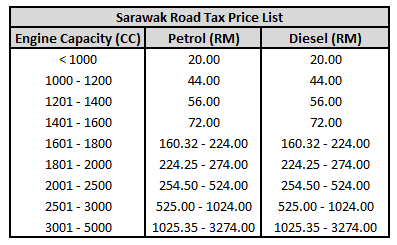
  3. Go to the counter and request for road tax renewal. The road tax price might be different depending on your engine capacity (cc), the states you live, and also whether you using petrol or diesel for your cars.
  4. Done and just stick the new Road Tax on your car.
[Tip 1]: The working hours for JPJ offices are from Monday to Friday, 7.45am till 5pm. To locate the nearest JPJ offices available close to your place, kindly click here

[Tip 2]: The JPJ counter knows exactly the process of renewing road tax, i.e. you just have to tell them "road tax renewal" and they will get it all done for you.

[Tip 3]: The whole process will take only around 5 minutes.

[Tip 4]: You can pay the road tax by cash or credit card. However, make sure you let the staff knows what type of payment you wish before he/she proceeds as once the payment method is selected in the computer system, it is irreversible.

[Tip 5]: The price list for road tax is shown as follows:


Monday, 29 February 2016

Online PDF to Word Document Converter and PDF Split For Free

As we all are aware of, most of the documents we found online or from someone else are usually in PDF format. Obviously, it is for the readers to read the document in a more convenient way (e.g. in iPad or tablet) and more importantly, it is to ensure the privacy and confidentiality of the documents so that others are not allowed to edit it. 

However, this is giving us troubles when we want to just use some of the words or the pictures in the PDF. Certainly, we do not want you to waste time typing out the words one by one from PDF to word documents. Hence, here we would like to introduce you the online PDF to word document converter that is free to be used!

Click this for online PDF to word document converter: http://www.pdfonline.com/


[Tip 1]: You can do the opposite also, i.e. convert from word document to PDF too using the link above.

You can easily get the PDF to word document converter online but not all of them are free. Some of them are free but only allows you to convert certain number of pages to word documents. Some might even need your email address to be keyed in so that they can send it over to you via emails. Hence, the link above is definitely your best option thus far as it is free online converter that can convert all the pages for you without any condition and no email address is required.

How to Use the Online PDF to Word Document Converter?

  1. Upload the PDF file that you wish to convert to word document.
  2. Wait for the uploading and converting process to complete. This might take a few minutes if your PDF has a lot of tables and pictures.
  3. Click the "Download" button available to download the word document and you are done!
On the other hand, in the case where you need to split your PDF into one or more pieces online, you can try the link below. Yes, again, it is easy and free without any condition.

Click this for online PDF Split: http://www.splitpdf.com/


The way to use this is similar to the above, but you need to put in the way you want the PDF to be split. 

Last but not least, we sincerely hope that these two links will be very useful for you in dealing with PDF files. In fact, we even recommend you to just bookmark these two links to your browser so that you can reach them in just a click. 

[Tip 2]: If you have no idea how to bookmark the links in google chrome, have a read at our previous post Google Chrome Bookmarks Hack.

Cheers.


Tuesday, 23 February 2016

Characteristics of Successful People

Ever wonder how a person can be successful even he or she is overwhelmed with the stress, workload or commitment in life? Everyone of us wants to be successful in life, but sometimes there are always certain things that are wasting our time and holding us back from reaching our full potential. This makes the successful people different from the others. Let's investigate the characteristics of successful people to help us to become successful.


  1. Successful people do not put themselves too much on social media

    Facebook, Instagram or Twitter are the among social media that in fact use up most of our time. Checking for notifications, scrolling through the pictures or videos, reading updates from friends, you wouldn't realize time flies by hours once you have started them. They are so addicted that you just can't control yourself. 

    So, successful people are usually those who are not that into these social media. And even they are, they set the time limit for this social media. They might even only get into it after completing their works. They generally use it as rewards.

  2. Successful people have a plan for the day

    Successful people appreciate the day from the morning till the end. They do not try to do something without a reason. In order to do that, they usually have a simple plan for the day so that they know what to expect for the day. This makes them more effective in doing works/tasks compared to those without a plan.

    Hence, what can we do is to list down all the tasks that you are planning to do for the days according to priority. Then, complete them one by one and cross off them from the list.

  3. Successful people do not hang out with negative people

    It is said that you are the average of the five people that you spend most of your time with. So if you want to be successful, you are advised to mingle with those successful people. Be sure you eliminate negative and toxic energy around you. Focus on the things you want to accomplish and do not worry about the things that you can't control.

  4. Successful people learn from the mistakes

    Successful people are not afraid of any failures at all. They know that failures or mistakes are just the stepping stones to their success. So, they learn and grow from the mistakes instead, and becoming a better person. Let's focus on what you have learned from the mistakes and design a strategy to move forward.
  5. Successful people do not forget about themselves

    We are always busy with our works and we don't get enough sleep or exercise. But for the long term efficiency and happiness, we should not forget and put ourselves first on the priority list.

    How? It is simple. We have to at least put something that we really enjoy into our daily activities; it can be as simple as reading a favourite book, meditating or jogging. Do what makes you feel relaxed and happy as a rewards for the special you.
After knowing the unique characteristics of successful people, it is now the time for us to change, not drastically, but at least gradually to remove those habits that are not quite healthy. When we are more efficient, works/tasks can be done quicker, less stress we will have and thus leading ourselves to the road of success.

Sunday, 14 February 2016

Apple to Allow Customers to Trade in Broken iPhone for New One

As you might know, Apple has been running iPhone trade-in program for some time which allows iPhone users to trade in their old iPhone to receive a gift card in return. The gift card will then be used to cover part of your expense in buying a new iPhone. However, currently, Apple still does not accept broken iPhone, eg. with a cracked screen, camera and broken buttons under the current trade-in program. 

But, wait, this might not be the case for much longer. According to 9to5 Mac, Apple is going to launch a new broken iPhone upgrade program which now allows customers to be able to trade in their iPhone even with damaged screen, malfunctioned camera, and broken buttons. 


[Tip 1]: This launching program only accept iPhones from 5s. 

However, according to the report, the damage must be "within reason", so you might be still out of luck depending on how Apple evaluates the phones. Customers can expect to trade in iPhone 5s for USD 50 (~RM 206), iPhone 6 for USD 200 (~RM 824) and iPhone 6s for USD 250 (~RM 1030). According to Apple, they hope the leniency in trading in phones can encourage customers to stay loyal to the company by taking advantage of it. 

[Tip 2]: The trade-in values might go up depending on the storage of your phones as well as the level of damage of you phones.

Another new service is coming to Apple Store will be the availability of free screen protector installations. It will be charged but you can get them installed in the Store using their new screen protector installation machines. Previously, Apple Stores were told not to install screen protector on behalf of customers as when it does not go as planned, customers tend to ask for a replacement or refund. However, with this new machine launched, Apple will provide a free replacement and attempt it again if the protector is not installed successfully. 

Here is a short video that shows how the machine works. Certainly, you don't have to remember the steps as it will be all done the Apple Store employees. Cheers.

[Tip 3]: Simply click here if you would like to view the video on YouTube.


Saturday, 23 January 2016

Your Best Modes of Payment for LRT/Monorail

Effective from 2 December 2015, all the Prasarana rail services including LRT and KL Monorail Line follows a new distance-based fares structure. Commuters now have 4 modes of payment which include token, cashless (i.e. Touch n Go, My Rapid card), MyRapid Smart 7 weekly and MyRapid Smart 30 monthly. You get different discount under different types of payment. Despite of bigger discount for Smart 7/ Smart 30 users, you should be aware of a regular premium charged on these two packages. The question comes next would be which mode of payment is the cheapest way for those who commute to work using LRT and monorail.


[Tip 1]: The set of four new fare structures released by Prasarana can be found here .

[Tip 2]: A premium fee of RM 2.50 is charged for "MyRapid Smart 7 Weekly" which is valid for 7 consecutive days whereas a premium fee of RM 10.00 is charged for "MyRapid Smart 30 Monthly" with validity of 30 consecutive days.

In general, you enjoy more discount when your mode of payment goes from token => cashless => Smart 7 => Smart 30. Nonetheless, it is not necessary that Smart 30 that provides most discount suits you the most. Let us now introduce a simple method to calculate the most suitable mode of payment for you together with examples.

Assumptions

The calculation is on monthly basis.
Average number of working days per month: 22 days

Example 1:
From Gombak to KLCC
Note: Monthly premium charged for Smart 7 is RM 2.50 x 4 = RM 10
Based on the calculation table above, the cheapest monthly fee is RM 133.20, i.e. for those who travel from Gombak to KLCC, Smart 30 would be your best option. 

Example 2:
From Wangsa Maju to KLCC
Note: Monthly premium charged for Smart 7 is RM 2.50 x 4 = RM 10
Based on the calculation table above, the cheapest monthly fee is RM 118.80, i.e. for those who travel from Wangsa Maju to KLCC, Touch n Go/ Rapid card would be your best option. 

As you can see, Smart 30 might not be the best option for all the users. You would be able to identify which option is the best for you by following the calculation method above.

With the increase in price of public transport, we hope this small life hack could help save some  of your money. 

Wednesday, 13 January 2016

Push Bullet: A Tool That Brings You Convenience

Have you ever encountered the time where you have something on your phone that you wish to send it to your laptop or to your other phone or both?

Or, have you ever encountered the time where you need to open a link from your phone to your laptop or to your other device?

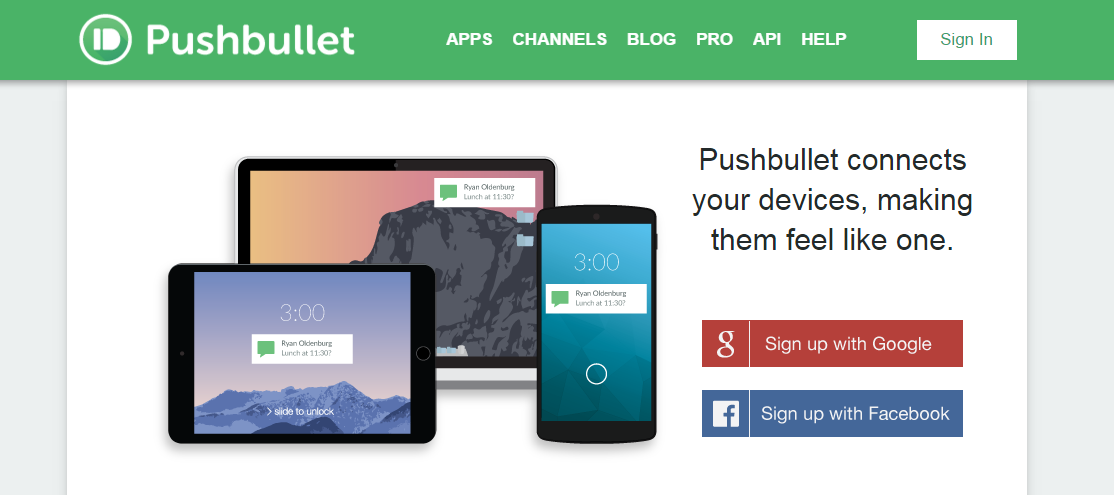
If your answer is a "yes", then Push Bullet will be your best app that you should definitely own nowadays. Here is how it is looking like: 

How does it work?
  1. Go to https://www.pushbullet.com/ and sign up an account with Gmail.
  2. Download the brower extension for your Google Chrome or Mozilla Firefox using the following links:


  3. Download the Push Bullet to your any phone/pad devices that you always share files to.
  4. Sign in the Push Bullet account that you have registered on step 1. As this is your first time, you would have to complete the set up as instructed step by step.
  5. You can then add all your devices accordingly by clicking the button highlighted in yellow below.

You are almost there now. In Whatsapp, you send messages/photos/links to your friends. With Push Bullet, your devices are like your friends now. Just send those files/messages/photos/links or whatever you wish to send to your devices instead. Pretty cool right? 

Life is really simple with Push Bullet. We hope you would really enjoy it.

[Tip 1]: If you send a link to your laptop, it will automatically open up the link for you which is really great

[Tip 2]: Before sending, you actually get to choose whether you want to send to "All devices" or any one of devices. In other words, you don't have to restrict yourself to always send your stuff to all devices.

[Tip 3]: You can send files up to 25 MB in size for one time.

Friday, 1 January 2016

Tips/Advice for writing your brand new year resolutions

3,2,1 Yay! Good Morning 2016!


2015 is the past and here comes 2016. No matter what you have done in the past year, good or bad, 2016 would be a brand new year for you to kick start your life, in terms of study, family, career, finance and etc. Hence, coming out with a set of your own new year resolutions could help ensure these aspects are all well covered and you will be pleased about what you have completed when you re-look them at the end of the year.

However, writing out your resolutions must be effective because when it is inappropriately set, you will be making yourself unproductive and ultimately setting the resolutions up for failures. Here comes some of tips that we believe to be helpful for you in writing your resolutions:

1) Scoping down resolutions to around 4-5 aspects that you want to focus on
Before you start writing out resolution, think about what aspects of life that you are planning to improve or enhance for the coming year. The aspects could be in terms of family, study, finance, career, health or any others that you think it is essential to you. Avoid stetting too many aspects. Chances are you are likely to lose focus when you have too many resolutions on hand. So, 4-5 aspects should be adequate.

2) Setting 1-2 resolutions for each aspects 
For each aspects, think of 1-2 resolutions that you would want to emphasize on. Remember, different people would have different resolutions so your friend's resolutions might not represent yours. Some examples of resolutions could be travel overseas once with your parents (family), pass certain exam paper (study), save at least RM x (finance), being a master of something (career). Again, avoid to have too many resolutions, i.e. 6-7 resolutions should be optimal.

3) Keeping your resolutions short
The resolutions should be short and easy to understand so that your mind is not overwhelming every time you look at them. 

4) Making your resolutions positive and always in present tense
Our brain can only take either positive or negative of a thing but never both. For instance, your brain can't take you are happy and you are sad concurrently. Hence, your resolutions must be always positive so that your mind can get use to it and help you achieve it. Besides, always write your resolutions in present tense rather than in other tenses. For example, you should write something like jog 3 times per week rather than I will jog 3 times per week. This is because future tense gives your mind the perception that "now" is not the time yet.

5) Making your resolutions measurable
"Jog 3 times per week" is more effective than writing "Do some running" for your resolutions. This is because you get to measure and check your progress when you write your resolutions in numbers. Without numbers, you might find yourselves some excuses and loopholes to skip running once a while and in the long run, your target is not achieved at the end of the year.

Finally, after setting your resolutions, always put the lists at places that are easily visible everyday so that they remind you from time to time. One last thing for reminder, never give yourself too much stress on the resolutions and not to overwhelm yourself. Moderation is the key. Plan your resolutions to your capability in order for them to be effective. 

We wish you a fantastic new year ahead and happy planning.  

Tuesday, 1 September 2015

EduSpace: The New Way of Home Tutoring

Worry about the coming exams? No ideas on how to handle language exams? Being stuck at Math questions that make you feel like giving up? Study stress? Thinking of having a good companion/mentor that guides you for your study? 

Are you passionate about teaching/guiding friends but you can hardly find people surrounding you that needs your help? Thinking of working some part time jobs during university long term break? Planning to get some revenue to pay off part of your education fees? Looking for a job with earning that matches your professional skills?

Proudly present you our one-stop tutoring platform: 


EduSpace is a platform that connects parents/students and tutors in a hassle-free way. We aspire to build a country-wide agency that could fulfill even the most specific requirements from parents/students and tutors.

How do we work?

EduSpace presents the first among all, EduPoints Program, a three tier ranking system to recognise dedicated and experienced tutors as well as to provide a clear expectation to the parents on the quality of tutors in each ranking. Through EduPoints Program, tutors are encouraged to continuously improve themselves as they are entitled to higher tuition rate as their ranking increases.

The rating systems work with the following simple 4 steps:
  1. Tutors are rated under EduPoints based on their experience
  2. Tutors are then categorised into either ,★★ or ★★★ tutors based on total EduPoints collected
  3. Parents are able to choose tutors with their preferred number of 
  4. The tuition rates would be based on the tutor’s number of 


Example

As a parent, Helen is looking for an English tutor for her Standard 3 daughter. Based on the table "Tuition Rates by EduPoints Program", the tuition rate will be charged per hour based on the tutor's number of , i.e. in this case, Grace can get a tutor for RM 30 per hour, or a  tutor for RM 35 per hour; or a tutor for RM40 per hour. She prefers the tutor to have teaching experience and thus she decided to get a tutor. 

As a tutor, Jimmy needs to first come out with total EduPoints based on the table "EduPoints Ranking Criteria". Say he is a school teacher and he has more than 5 years of teaching experience. Based on the EduPoints Program, he will earn 5 EduPoints for being a school teacher; earn 10 EduPoints for having more than 2 years of teaching experience. This brings a total EduPoints of 15 which EduSpace would categorise him as a ★ tutor.

We, as EduSpace, will screen our database and found that both Helen and Jimmy should connect as their profile matches to each others. Matching process will be carried out and if both accept the offer, Jimmy will be tutoring Grace's Standard 3 daughter for RM 35 per hour.

What can you do now?

If you are parents/students looking for a private home tutor, click Request for Tutor

If you are looking for tutoring jobs, click  Join as Tutor

If you wish to know more about us or get more updates from us, like our EduSpace Tuition Facebook Page now.

Still confused? Send us an email at admin@eduspacetuition.com or whatsapp/call us at +6018 311 4711.

Help us share the page or comments below if you have any recommendations.

Sunday, 16 August 2015

How to add a website shortcut to iPhone/iPad Home Screen (Steps by Steps with Pictures)

Feeling fatigued to always spend a minute or two to open a certain website, e.g. news website, blog etc. using iPhone/iPad everyday? Have you ever imagined if there is a way to open the daily website in seconds?

Here comes an excellent feature for the iPhone/iPad users that you might not know, i.e. you can add the website shortcut to your iPhone/iPad home screen. Once set, the website will be shown as if you have just downloaded a new "app". You can just open the website by clicking the "app" as if you are opening an normal app.

So, how do you add the website shortcut?

1. Launch "Safari".


2. Enter the URL of the website that you want to create a shortcut into the address field.


3. Tap the left blue north-pointing arrow coming out of a box located at the bottom of the page.


4. A small window will open and now you can tap the "Add to Home Screen".


5. Upon confirmation, tap "Add" to complete the process. Safari will automatically be closed and you will be taken to where the icon is located on your iPhone/iPad's home screen. 


[Tip 1] This website shortcut is only available if you open the website in Safari.

[Tip 2] If the website name is too long, you can edit the name before you click "Add".


Hope it does save some of your time! Enjoy!

Friday, 2 January 2015

Top 20 Free Apps iPhone/ iPad New Users Should Have

A new user for iPhone 6? Or did you just switch to an iPhone user? Or even, did you just trade in your old phone to get a smart phone? Get bored with your iPhone Apps and wonder what Apps will be useful for you?

You have come to the right place. The following are the top 20 Apps in my iPhone that I think is necessary to have them in your iPhone or iPad too.

1. Facebook


Without any doubt, Facebook is now the App/Page that almost all the teenagers/adults will use daily. With Facebook, you can get the quickest and latest updates about your family, friends, news, infotainment and other relaxing videos that can relieve your mind after a whole day of working. 

[Tip 1] Whenever you saw advertisement or articles that your friends posted and you don't feel like seeing them anymore next time (e.g. if one of your friends uses his/her facebook for selling products purpose), you can simply unfollow this friend. Note that this is not saying you unfriend your friend and thus your friend would not get notified when you just unfollow their posts. 

[Tip 2] Facebook always provide you the latest updates. Hence, to get full use of it, you can like those news page such as TheStarOnline , BBC news , iProperty and etc to get yourself updated besides thinking of Facebook is solely for entertainment purpose.


2. Whatsapp


With the high costs of text messages/phone calls and the popularity of using smart phones, Whatsapp is now the most common social media that people use to communicate with each other using only internet. Hence, this App should also be a must for you to be installed in your phone so that your friends can communicate with you more conveniently as well as saving costs.

[Tip 3] All your contact lists will be automatically listed in your Whatsapp contact list if the number is with country code. So, to get connected with your friend, remember to save your friend's number with country code.

[Tip 4] Worry about lost of records if you were to change your Whatsapp number? Check out our previous page of How to Change Whatsapp Number


3. Instagram

For those who prefers to see pictures rather than lots of wordings in a post, Instagram gives you the chance to see entirely on the photos posted/uploaded by your friends and you get what your friend feels through their photos. Less wordings and more colourful photos;)

[Tip 5] Instagram has a sophisticated editing tool for you to make your photo better before uploading it for your friend to "love" it. Moreover, this edited photo will be automatically save in your camera roll while maintaining the original photo for you to view both even without internet access.


4. Mailbox

With this Mailbox App, you are able to get notifications whenever you receive an email. Furthermore, you can choose to read it later or just delete it in easy way. The best part is if you own a few email account, you can in fact add them all together under this Mailbox. So, no more excuse you will miss any email from all of your account.


5. Flipboard


This is another cool App that you should have it in the front page of your phone. In brief, Flipboard is an App that will show all the information/updates based on what you have followed. For instance, you can follow BBC news and you can read all its news in the app. This app is particularly suitable when you feel like having some articles to read while waiting to someone or while commuting to work. The articles are usually not long and with pictures which I bet you will get addicted to it.

[Tip 6] Possible links to follow are News, Business. Sport, Technology, Science, Travel, Photography, Design, Style, Film, Celebrity News, Gaming, TV, Politics, Food&Dining, Health, Auto, Shopping Beauty and many more.

[Tip 7] If you are at rush while looking at one interesting article, you can click the "+" button at the bottom right of it to save it in your own account and then read it later. You can also create and personalize your own magazine consisting of all the interesting articles that you have saved.


6. LINE

This app acts similar to Whatsapp but some people might prefer this more than Whatsapp as it has additional cooler functions that Whatsapp does not have at the moment. This includes a variety of cute stickers LINE has for you to play around with especially when you are chatting if your partner or good friends. Besides, it has another awesome function, i.e free video calls. In other words, you can now use it to video call your friends/family without costing you any but just internet.

[Tip 8] You registered LINE using your email account which means you don't have to worry at all when you come to changing your phone number.

[Tip 9] Follow up the LINE Event in your country and answer the questions they ask occasionally and you might get a drink for free! No worries, the question isn't hard at all.


7. Online Banking App 

With the availability and popularity of online banking, having your preferred bank app, eg. Maybank2U can definitely make your life a lot easier. You can do fund transfer anywhere without needing laptop or computer anymore.

[Tip 10] Maybank2U allows you to see all the accounts available including Saving and current account, credit card account, fixed deposit, loans and investment account.

[Tip 11] With the latest update, you can even use the App to pay the favourite bills that you saved in your account.

[Tip 12] With this app, you can also locate the nearest ATM machine with ease especially when you need to pay something by cash.


8. Messenger

Messenger allows you to chat with your facebook friends or even have a group chat. This app is not necessary at the first place until facebook chat in Facebook App is no longer available recently. Anyway, this Messenger is similar to LINE app in which it can send stickers to your friends as well as having free phone call to your friends via Messenger.


9. Malaysia News

After stepping into working life, everyone is keeping themselves updated with the latest news and so you should too. Instead of installing different types of news app such as Star Online, SinChew, New Strait Times, Malaysia Kini etc, you can just download this awesome App. It consists of ALL of the newspaper in Malaysia! Save space in your phone and get updated from various of newspaper, why not?

[Tip 13] It also consists of Quick Info tab for you to get updated with weather, lottery result, public holiday,pollution index, job boards and deals and promotion. In brief, it is an All in One App.


10. Malaysia Radio 

Besides Malaysia News, we also have Malaysia Radio which acts similar but is on radio. You can get a whole list of Malaysia Radios for you to listen live. Again, this saves your work to install all your favourite radios one by one and saves your space in phone too. Don't be surprised as you might discover there are actually so many radios fm available in Malaysia:)


11. Waze

As you will need to travel along, this Waze helps you to plan your journey and avoid congestion. This is particularly useful if you can hardly remember the directions and routes and even if you are not the one, you should also have it as you will need it one day.

[Tip 14] To know more about how to use this App, check out our previous post at 


12. RapidKL

I believe some of you might not be aware of this new app launched by RapidKL. Now you can just put your current location and destination and RapidKL can tell you how to get there using LRT and RapidKL buses. 

[Tip 15] Even if you are familiar with your working route, you should still have this in your phone as it actually shows the full map of LRT and KTM routes that you might need it later.


13. MyTeksi

Anxious about reaching office or client's place late? Tired of waiving hands to the taxis and no one responds to you? Yes, you should have this app with you. Now, you can key in your destination in the app and all the registered nearby drivers will bid and see who will get you to the destination!

[Tip 16] After you key in all the details and once bid is successful, it will show you the taxi driver's name, the taxi plat number and also the taxi fee. Everything is just so transparent and you should have no worries anymore;)


14. Carousel

With most of the photos being saved in your camera roll, you might realise your phone is running out of free space but at the same time you don't feel like delete all the memory that you've captured. Carousel is a new app here to solve your problem. You can now save your photos and back up them in Carousel. The photos in Carousel are still available to be shared via email, text message, whatsapp and etc. As well as freeing up space in your phone, you can also view the photos even without internet access.

[Tip 17] As we all know, it is relatively harder for you to transfer your photos from phone to laptop. However, with all the photos saved in Carousel, you can simply sign in Carousel in your laptop and have the photos downloaded in your laptop. It is just that simple and is guaranteed.


15. LinkedIn

If you are currently looking for a job or planning to change job, LinkedIn is always the best app for you to check up with. Basically, it works exactly the same as website version but now you can simply have it in your phone.


16. Sound Hound

Sometimes, you might have listened some familiar music but you just can't get the song name  for you to download it later. Rather, you can use Sound Hound to track the music and tell you what is that song. It can keep your searches in history and so makes your life easier and happier without needing to scratch your head hard to think of what is the song just now you listened in the shopping mall.

[Tip 18]Even cooler, you can get the lyrics too after Sound Hound has detected the song and you can sing along with the music, by looking at the lyrics:)


17. Google Drive

Yes, it works exactly like the website version, but with this Google Drive available on your phone, you can save your reading articles/PDF in it and have a read with them while commuting to work.


18. Stumble Upon

This App is similar to Facebook, but instead of having information posted by your friends, Stumble Upon has all the special knowledge and information shared by other people. I found this is very useful when I feel bored sometimes working on something. This is because Stumble Upon always gives special knowledge for me and it never fails me so far.


19. Game App

After introducing so many apps which focus more on productivity, you as a new user should have some entertainment in your phone of course. For me, game apps can be sociable too as you get to discuss with your friends about the strategies and excitement of playing them. Hence, Plant vs Zombies 2 would be my recommendation for you since it is famous around the world and most of your friends should have known it well. Perhaps you guys can share the strategies with each others when awkward moment happens during lunch time, if there is;)

[Tip 19] For Plans vs Zombie 2, there is always one new game for you to play starting every 12am and you get to choose 3 rewards if you won the game. This can be your entertainment before you go to bed.


20. Wallpapers

As a new phone user, I believe you will always want to find the best wallpaper to make your phone even more attractive. Thus far, I found Wallpapers App provides the most variety of wallpapers that suit me well. There are Latest, Popular , Random columns for you to choose the wallpaper in case you are indecisive or no idea what wallpapers to choose from. 


Yeah, with all these 20 Apps installed in your phone, you should have no worries and I would say you have utilized your smart phone quite well. Try out all the apps and I hope you enjoy using them.